Your own 15-second MV with HeyBop: tutorial and timed example
Start with a song and a simple idea. In HeyBop.ai, you can choose a passage, add a character photo, approve the pictures and make a finished music video in one workspace. You do not have to assemble the generated clips in another editor to see your first cut.
How fast is it? A first-party follow-up reached the completed video’s first playable frame in 36.947 seconds after the final Make confirmation. The finished video lasted 15 seconds. This is one dated observation with the pictures prepared in advance, rather than a typical speed or a fixed delivery guarantee. The earlier three attempts are also shown below.
Is this a useful workflow for a beginner?
HeyBop is a useful option to try when you have a song and want new generated scenes without assembling the clips in a separate editor. Its main convenience is keeping the passage, image approval, moving scenes, finished cut and scene revisions together. You still need to choose a direction and watch the result: a convincing still picture does not guarantee convincing movement.
If your priority is arranging existing photos or preserving exactly what happened in real footage, a montage or video editor may suit that task better. If you want a new imagined scene for your song, start with a short passage and inspect a complete example before committing to a longer project. The tests below show the actual wait and the limits we observed.
1. Choose a short passage from your song
Choose the passage you want to use. Choose 15 seconds and adjust the start and end. A chorus, a memorable line or a musical change gives a short video a clear focus.
You can use a recording you own or a Suno song you have permission to use. The Suno-to-MV guide explains that workflow. The supported upload formats in the FAQ include “MP3, WAV, FLAC, M4A, AAC, OGG”. If a platform refuses access to a link, upload an audio file you are allowed to use.
Song selection, uploading, story design and picture preparation happen before the timed Make operation. Include them when planning the whole creative session.
2. Give the video a simple visual direction
Choose your style and format. Add an optional photo of yourself, a friend, a pet or a mascot, with permission where needed. Use Standard for realistic human portraits or references that cannot be verified as suitable for Professional. The photo-reference checklist explains what to inspect.
Our example used a white terrier in a yellow dress on a garden path at blue hour. Its task was simple: notice a glowing upright prism, approach it, then sit beside it. Plain language is enough to describe the story you want.
3. Approve the actual video pictures
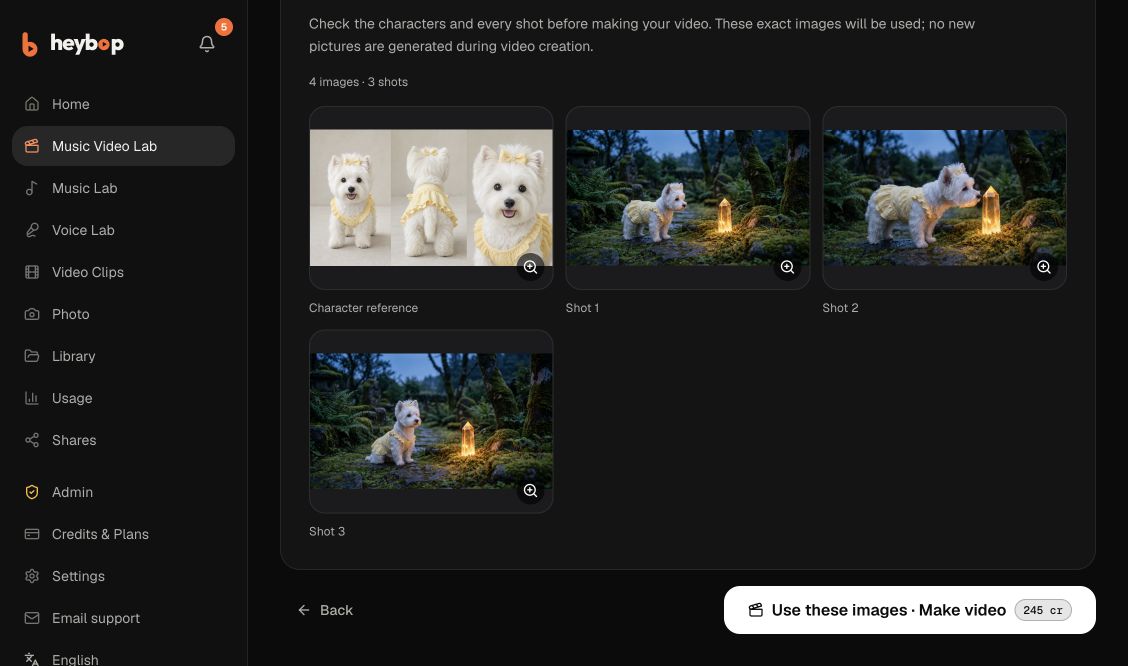
Read the script, then inspect every image in the video confirmation. Check identity, clothing, important objects and framing. This example used four unique image files: one saved character sheet and three shot images. The three views within the character sheet were not three separate uploads.
The same approved image files were reused across all four attempts. The video phase created zero additional AI images. That makes the handoff easy to understand: inspect the pictures first, then generate movement and the finished cut. Motion can still differ from a still image.
4. Check the quote and make your video
Confirm Standard quality, lyric subtitles and whether you want Sing along. Our tests used Cinematic landscape framing, three five-second scenes, subtitles enabled and Sing along disabled. The follow-up film includes timed lyric captions. This is not a Sing along performance benchmark.
Each video-and-assembly operation quoted 245 existing credits.
These runs reused cached previews.
Preparing three new storyboard images has a separate 60-credit quote. Confirm the quote for your own project.
Choose the final Use these images · Make video confirmation. HeyBop generates the moving scenes and cuts them to your song. You can then play the full result, download it or review an individual scene in the same workspace.
Benchmark: Make click to first playable frame
The clock began at the final Make confirmation and stopped when the completed video decoded its first frame. It did not stop at a progress message. Downloading, pressing Play after readiness and watching the whole film were excluded.
| Release and attempt | Make to first playable frame | Delivery |
|---|---|---|
| Earlier release, first | 42.637 seconds (first test) | Full video completed |
| Earlier release, second | 47.032 seconds (second test) | Full video completed |
| Earlier release, third | 42.792 seconds (third test) | Full video completed |
| Updated release, follow-up | 36.947 seconds (follow-up test) | Full video completed |
The earlier three attempts had a median of 42.792 seconds, with a minimum of 42.637 seconds and maximum of 47.032 seconds. Their results remain retained. The follow-up is reported separately as one observation on the updated release; it is not pooled into that earlier median.
All four used the same song passage, character and approved image files, while generating fresh moving takes. They were desktop browser observations, not a phone benchmark, an independent rating or a comparison with another product. Supplier timing also varied. Shared prompt-normalization wording had also changed between releases, so this is not a strict one-variable A/B experiment. These observations do not isolate how much of the difference was caused by any one optimization. From the HeyBop.ai FAQ: “Timing varies with length, quality and demand; we email you when it is ready.”
Can I say a video takes 30 seconds to make?
The follow-up supports describing this particular example as a 15-second MV made in about 37 seconds after picture approval. It does not establish that every video finishes in 30 seconds. Output length and production time are separate. Check the dated method and every result when evaluating a speed claim.
Watch the finished movement before sharing
All four outputs were 15-second H.264/AAC MP4 files at 1920×1080 and 24 frames per second, and were played through to the end. Export dimensions do not establish the native resolution of every generated source clip.
The white terrier, yellow clothing and garden remained recognizable in manual playback, with some generated movement and framing variation. The current follow-up recorded three passed automated checks and one unavailable check, with no rejected check; unavailable was not counted as passed. The earlier third attempt retained an anatomy warning. A sample audit did not confirm extra limbs, but that warning remained. Current quality notes are suggestions: watch the playing film and decide what needs changing. Four technical completions do not establish an overall success or failure rate.
Watch the current timed example. Its title records: “15-second MV in 36.947 seconds — HeyBop real speed test”. It is the actual follow-up first take, rather than a later replacement.
The earlier first sample also remains available. Its description records: “First-party test on 22 October 2026: final Make confirmation to first decoded frame in 42.637 seconds.”
Change one shot while keeping the rest
Edit the affected scene's description or camera direction, then choose a replacement. Saving a description does not change footage that was already generated. Keep earlier takes available and inspect the updated cut with the song.
Each project gets one free shot redo per complete 30 seconds of its first finished video, with at least one. A 15-second video and a 30-second video each get one; a 60-second video gets two. This allowance belongs to the project, rather than to every scene. It uses the original shot's quality, duration and singing setting. A successful replacement consumes a redo; a generation error does not.
The current redo rules explain: “Once it is used up, the next attempt shows its credit price before you start.”
Check rights and watermark settings
Generation credits and commercial export rights are separate.
The current pricing page distinguishes the first personal short, a release-ready project purchase and memberships. Eligible licensed projects and memberships support watermark-free commercial exports; top-ups alone do not unlock those rights. You also need permission for the music and photos.
For a first personal MV, the convenience is having your song, picture approval, moving scenes, finished cut and scene revisions together. Start with a short passage, give it a clear action and review what you get.
Make your personal music video with HeyBop.ai